In today’s modern manufacturing era, CNC (Computer Numerical Control) programming stands as a cornerstone, bridging design intent with material reality. At the heart of countless products, from simple tools to complex machinery, lies the precise and consistent handiwork of CNC machines. Yet, this mechanical precision is governed by human-designed codes and commands. Many perceive CNC programming as a labyrinthine domain, but it’s much like any other language – albeit one spoken between humans and machines.
This expanded discourse provides an in-depth look into CNC programming, helping novices and experts alike navigate the nuances of this intricate domain.
What is CNC Programming?
Delving into the manufacturing world, CNC programming emerges as the silent maestro orchestrating symphonies of cuts, drills, and carves. It’s the meticulous process of drafting a set of commands for CNC machines. These commands guide the machine’s every movement, ensuring operations are performed with precision and accuracy.
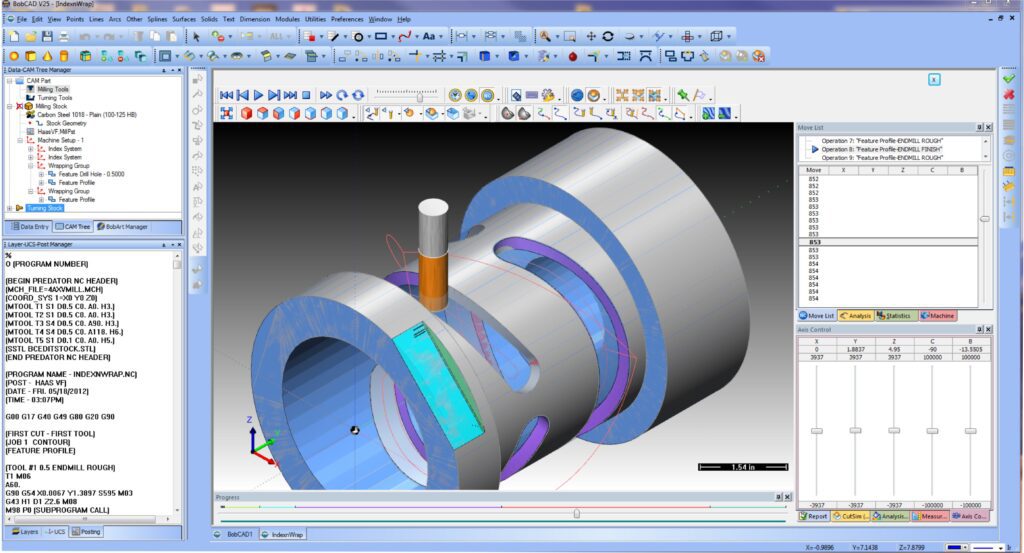
Setting up the CNC program for machining
At its core, CNC programming is about transforming a design into a set of actionable commands. This transformation involves a deep understanding of both the design intent and the capabilities of the CNC machine.
Table 1: CNC Programming Languages
| Language | Description | Common Use |
|---|---|---|
| G-code | Universal CNC programming language | Milling, turning, and more |
| M-code | Auxiliary function commands | Spindle operations, coolant control |
| Conversational Programming | User-friendly, high-level commands | Lathes, turning centers |
How does it work?
- Design Input: The journey begins with a design, usually crafted in CAD (Computer-Aided Design) software. This design holds the creator’s intent, detailing every curve, edge, and dimension.
- Translation: This design is then translated into a series of commands. If G-code is used (as it often is), the design’s curves might be transformed into a series of G02 and G03 commands, guiding the machine’s path.
- Safety Checks: Before the machine gets to work, the generated CNC program is typically run in a simulated environment. This “dry run” ensures the machine won’t encounter any unexpected obstacles or errors.
- Execution: With checks complete, the CNC machine springs to life, faithfully executing every command. As it follows the program’s directives, raw material is shaped, shifted, and subtracted from, revealing the intended design.
- Verification: Post-processing, the final product is checked against the original design, ensuring every specification has been met. Any discrepancies can lead to program adjustments for future runs.
The Basic Elements of a CNC Program
A CNC program, much like a symphony, is composed of distinct elements, each serving its unique role. These elements, when sequenced correctly, enable CNC machines to transform raw materials into finished products with astounding precision. Understanding these foundational blocks can make the process of CNC programming more comprehensible and actionable.
Table 2: Essential Components of a CNC Program
| Component | Description | Example |
|---|---|---|
| Start & End Codes | Signifies the beginning and conclusion of the machining process. | % (Program start), M30 (Program end) |
| Tool Selection | Commands the machine to use a specific tool from its carousel. | T1 M06 (Select tool 1) |
| Feed Rate | Governs the speed at which the machine operates. | F150 (Feed rate of 150 units per minute) |
| Coordinates | Commands that guide the tool’s movement and position on the material. | X10 Y20 Z5 (Move to position X=10, Y=20, Z=5) |
Key Insights:
- Start & End Codes: Every CNC program requires an explicit start and end. This not only helps in segmenting different programs but also ensures that miscellaneous codes do not interfere with the machining process.
- Tool Selection: CNC machines typically have a carousel of tools, ranging from drills to end mills. The tool selection command ensures the correct tool is used for the specific operation, ensuring precision.
- Feed Rate: Too slow, and you waste precious time; too fast, and you risk damaging the tool or material. The feed rate must be optimized based on material type, tooling, and desired finish.
- Coordinates: They are the crux of a CNC program, dictating the exact path a tool must follow. The precision of these coordinates ensures the accuracy of the final product.
Diving into G-Code
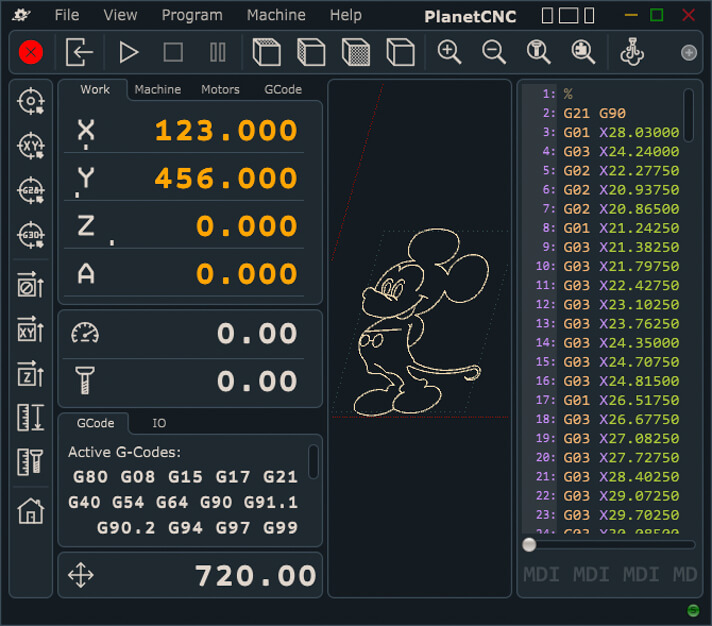
G-code execution for CNC machining
G-code stands as the universal language of CNC programming. Born from a need for standardization across CNC machines, G-code provides a set of commands that are interpretable by nearly all CNC machines, regardless of their make or model. Delving deeper into G-code offers insights into how designs are translated into tangible objects.
Table 3: Frequently Used G-Code Commands
| Command | Description | Example |
|---|---|---|
| G00 | Rapid positioning – moves the tool as fast as possible to a specified location. | G00 X10 Y5 (Move rapidly to X=10, Y=5) |
| G01 | Linear interpolation – moves the tool in a straight line. | G01 X20 F150 (Move straight to X=20 at a feed rate of 150) |
| G02 | Clockwise circular interpolation. | G02 X15 Y15 I5 J10 (Arc to X=15, Y=15 with a center offset of I=5, J=10) |
| G03 | Counterclockwise circular interpolation. | Similar to G02 but counterclockwise. |
Key Insights:
- Standardized Yet Flexible: While G-code offers standard commands, it’s versatile. Different machines might have unique additional commands, but the core remains consistent.
- Interpolation: One of G-code’s standout features is its ability to command not just straight (linear) movements but also curved (circular) ones. This capability enables intricate designs and paths.
- Modal vs. Non-Modal Commands: Some G-code commands remain active until changed (modal), while others execute once and then deactivate (non-modal). For instance, if you set a feed rate using
F150, that rate remains active for subsequent commands until a new feed rate is specified. - Parameters and Variables: Advanced G-code programming might involve parameters and variables, allowing for conditional logic and loops, making the CNC program more dynamic.
Try Ancastings Now!
Diving into M-Code
While G-codes primarily deal with the machine tool’s movement, M-codes or miscellaneous function codes handle various machine functions like tool changes, coolant activation or deactivation, and machine start and stop.
Table 2: Common M-Codes in CNC Programming
| M-Code | Description |
|---|---|
| M00 | Program stop |
| M01 | Optional stop |
| M02 | Program end |
| M03 | Spindle start (clockwise) |
| M04 | Spindle start (counterclockwise) |
| M05 | Spindle stop |
| M06 | Tool change |
While the specific G-codes and M-codes may vary based on the CNC machine type and the control system, the concept remains consistent.
The Process of Creating a CNC Program
Crafting a CNC program is not merely about scripting lines of code; it’s a systematic process that ensures a design is translated accurately into a tangible object. From ideation to execution, each step in this process requires meticulous attention to detail.
Table 4: Steps in Creating a CNC Program
| Step | Description |
|---|---|
| Design Phase | Initial product or component design using CAD (Computer-Aided Design) tools. |
| Conversion | Translating CAD design into a CAM (Computer-Aided Manufacturing) software for toolpath generation. |
| Simulation | Running a virtual test to detect any potential collisions or errors in the program. |
| Post-Processing | Generating the machine-specific G-code or M-code from the CAM software. |
| Trial Run | Executing the program on the CNC machine, often without the material, to ensure smooth operations. |
| Final Execution | Actual machining of the material to produce the desired component. |
Key Insights:
- Design Phase: This foundational phase is crucial. A well-designed CAD model ensures fewer complications during the translation to CNC codes. Dimensional accuracy, understanding material constraints, and foreseeing potential machining challenges all play a role.
- Conversion: Modern CAM software has made it much easier to convert 3D models into toolpaths. However, the software usually offers various toolpath strategies, and selecting the optimal one can drastically impact machining time and product quality.
- Simulation: This is the CNC program’s “dress rehearsal”. Errors, potential collisions, and toolpath inefficiencies can be detected and rectified during this phase.
- Post-Processing: Different CNC machines interpret commands slightly differently. Post-processors ensure that the toolpath generated by CAM software is translated into machine-specific commands.
- Trial Run: Often called a “dry run”, this step verifies real-world operability, ensuring that the machine moves as expected and that there are no unforeseen complications.
Tips on How to Program a CNC Machine
For beginners and seasoned professionals alike, CNC programming offers an array of challenges. To ensure successful outcomes, several tried-and-true tips can be invaluable.
- Know Your Machine: Understand the capabilities and limitations of your specific CNC machine. Does it support 3-axis or 5-axis operations? What’s its maximum feed rate? Familiarity can prevent potential errors.
- Optimize Toolpaths: Using CAM software, explore various toolpath strategies. Spiral, zigzag, radial—each has its advantages depending on the design and material.
- Regularly Update Software: As software evolves, newer versions offer refined algorithms, better simulation tools, and support for more post-processors. Stay updated to leverage these advancements.
- Standardize Your Processes: Develop a consistent method for programming, which can help reduce errors and streamline the programming process.
- Maintain Tools: Regularly check the sharpness and condition of cutting tools. Dull or damaged tools can compromise product quality and even damage your machine.
- Utilize Comments Generously: G-code allows for comments (often using parentheses). These can help clarify complex sections of code, making future edits or troubleshooting more straightforward.
- Backup Regularly: As with any digital work, regular backups can save hours of effort and prevent data loss. Use cloud storage or external drives for redundancy.
- Stay Informed: The world of CNC machining is ever-evolving. Attend workshops, join forums, or participate in online communities to keep abreast of the latest techniques and trends.
Advancements in CNC Programming Technology
The CNC world is not static. As with most tech domains, it’s evolving, with advancements aimed at making programming more intuitive, efficient, and versatile.
Bulleted List: Key Technological Advancements
- AI-Powered Optimization: Machine learning algorithms analyze past operations to suggest optimal feed rates, tool paths, and more.
- Cloud-Based Collaboration: Programmers can work on CNC programs collaboratively in real-time, making team projects more seamless.
- Enhanced Simulation Tools: More realistic graphics, real-time feedback, and virtual-reality integrations make for immersive and accurate program testing.
- Adaptive Machining: CNC machines can now adapt in real-time, adjusting tool paths based on sensor feedback, ensuring consistent product quality.
- Integration with IoT: Real-time data streaming from CNC machines allows for remote monitoring, predictive maintenance, and seamless integration with other smart factory systems.
Table 5: Comparison Between Traditional and Advanced CNC Programming
| Feature | Traditional CNC Programming | Advanced CNC Programming |
|---|---|---|
| Programming Method | Mostly manual input | Automated with AI suggestions |
| Data Storage | Local databases or machine storage | Cloud storage with real-time backup and access from anywhere |
| Simulation | Basic graphics, limited real-time feedback | High-definition, VR-integrated, with instant feedback |
| Error Correction | Mostly manual intervention | Real-time adaptive corrections based on sensors and algorithms |
The Future of CNC Programming
With a foundation built on precision and automation, CNC programming is poised for continued evolution. While predicting the future is never exact, current trends hint at what lies ahead.
The following are the key predictions for the CNC world in the near future;
- Fully Automated Workshops: From design to product, automation might soon oversee every step, requiring minimal human intervention.
- Sustainability Focus: Enhanced programming might prioritize energy efficiency, waste reduction, and the optimal use of sustainable materials.
- Decentralized Manufacturing: As CNC machines become more accessible and programming becomes more user-friendly, we might see a rise in local, decentralized manufacturing hubs.
- Integration with Augmented Reality: AR tools might enable programmers to overlay CNC paths on physical materials, providing an intuitive programming experience.
- Cross-industry Collaboration: CNC programming might integrate more seamlessly with other industries, leading to innovations we’ve yet to imagine.
Table 6: CNC Programming Over the Decades
| Decade | Key Focus |
|---|---|
| 1980s | Introduction of CAD/CAM integration |
| 1990s | Rise of PC-based controllers and introduction of more user-friendly interfaces |
| 2000s | Expansion of high-speed machining and multi-axis operations |
| 2010s | Integration of IoT, AI, and enhanced simulation tools |
| 2020s & Beyond | Emphasis on sustainability, AR/VR integrations, and the proliferation of collaborative, cloud-based platforms |
Real-Life Example of a CNC Programming
Understanding the intricacies of CNC programming can often benefit from concrete examples. Here’s a real-life scenario of a simple CNC program designed for a 3-axis CNC milling machine. This program aims to machine a square piece of metal into a simple 50×50 mm square pocket that is 5 mm deep.
Scenario: Imagine you have a block of aluminum that’s larger than the desired pocket size. You’re using a 10mm diameter end mill tool for the machining process.
G-Code Program:
gcodeCopy code
(Starting the program with a comment – Simple 50x50mm pocket milling)
O0001 (Program number)

N1 G21 (Set units to mm)
N2 G90 (Absolute positioning mode)
N3 G40 (Cancel diameter compensation)
N4 G80 (Cancel motion mode)

N5 M03 (Start the spindle clockwise)
N6 G54 (Select work offset coordinate system)
N7 G0 Z50 (Rapid move to safe Z height)
N8 G0 X0 Y0 (Rapid move to the origin point)

N9 T1 M06 (Select tool 1 and tool change)

N10 G43 H1 Z50 (Tool length compensation for tool 1 and move to safe Z height)
N11 M08 (Coolant on)

N12 G0 X25 Y25 (Move to the pocket center)
N13 Z5 (Rapid down a bit closer to the starting Z level)
N14 G1 Z-5 F100 (Feed move to start milling 5mm deep at 100mm/min feed rate)
N15 G17 (XY plane for circular motion)
N16 G2 X25 Y25 I-25 J0 F250 (Clockwise circular motion to cut the pocket)

N17 G0 Z50 (Retract the tool to safe height after milling)

N18 M09 (Coolant off)
N19 M05 (Stop the spindle)
N20 G91 G28 X0 Y0 Z0 (Return to machine home position)

N21 M30 (End of the program)
Explanation:
- Headers: The program starts with initial setups like defining the unit system, positioning mode, and diameter compensation.
- Spindle & Tool: The spindle is started, and the relevant tool (T1 in this case) is selected.
- Positioning: The tool is moved to the starting point of the pocket.
- Milling: The milling operation starts, with the tool cutting a 5mm deep pocket in a clockwise direction.
- Completion: The tool is retracted to a safe height, and auxiliary functions (like the spindle and coolant) are turned off. The machine returns to its home position.
Ancastings’ CNC Machining Services: Precision and Customization
The CNC world is broad, and among the stars that shine brightly in this domain is Ancastings’ CNC machining services. With a commitment to precision, efficiency, and innovation, Ancastings stands as an epitome of what top-tier CNC services should encompass.
- Precision Engineering: Ancastings utilizes state-of-the-art CNC machines to ensure that every product meets the highest standards of precision.
- Versatility: From metal to plastic, Ancastings’ machinery and expertise span a broad range of materials and product types.
- Rapid Turnaround: With a focus on efficient processes and operations, Ancastings promises swift delivery without compromising on quality.
- Advanced Software Integration: Ancastings is always on the cutting edge, integrating the latest CNC programming software to ensure flawless execution.
- Customer-Centric Approach: Understanding the client’s needs is paramount. Ancastings’ team engages in comprehensive consultations to deliver tailored solutions.
Conclusion
CNC programming stands as a testament to human ingenuity, merging the worlds of design, engineering, and production into a seamless workflow. From understanding the core elements like G-Code to mastering the intricacies of programming a CNC machine, the journey is one of constant learning and evolution. Companies like Ancastings, with their advanced CNC machining services, are leading the charge, demonstrating the transformative power of this technology. As we forge ahead into a future where precision and efficiency are paramount, CNC programming will undoubtedly play a pivotal role in shaping the landscape of manufacturing.
FAQs
What is CNC programming?
CNC programming is the process of creating a set of instructions for a CNC machine to produce a part based on a given design.
How do I start learning CNC programming?
Start with understanding the basics of machining processes, then delve into G-code basics, and consider formal education, online courses, or hands-on training.
Why is G-code essential in CNC programming?
G-code is the language that CNC machines understand. It provides detailed instructions on how the machine should operate to produce the desired part.
What industries benefit most from CNC programming?
Almost every manufacturing industry benefits, notably aerospace, automotive, healthcare, jewelry, and construction, among others.
How does Ancastings’ CNC machining services stand out?
Ancastings emphasizes precision, versatility, rapid turnaround, cutting-edge software integration, and a customer-centric approach, ensuring top-quality outcomes every time.